
Star Wars Zero Company operations guide overview
Learn how Star Wars Zero Company Operations use Intel, expire across Cycles, unlock Missions, return rewards, and affect Bonds and side missions.
The direct answer
Star Wars Zero Company Operations are non-combat assignments selected from the Galaxy Map at The Den’s Holotable. They can require Intel and can return resources, narrative information, or access to another Operation or Mission. Some Operations also present a dilemma, so the choice you make can matter to Bonds and side missions.
Operations sit beside Tactical Missions in the campaign loop. A Tactical Mission deploys the selected squad into turn-based combat and advances the campaign to the next Cycle. An Operation uses the strategic layer instead, which gives you time to manage information and consequences before choosing the combat mission that will end the Cycle.
Do not treat every Operation as a permanent checklist item. Both Operations and Missions can expire, while story-critical missions become obligatory after a period of time. The exact timer, cost, reward, and branch availability depend on the current campaign state and are To be confirmed when the interface does not show them.
Where to find Operations
Return to The Den and interact with the Holotable on the command deck. The campaign view separates the Operations layer from the Missions layer, so check the correct tab before deciding that an assignment is missing. Read the briefing or visible panel rather than relying on the short label alone.
The map can show several kinds of work at once. A story task may push the campaign forward, a personal mission may connect to an Operator, and an optional contract may offer a resource or a tactical test. The mission board uses separate labels for main story, Hero, and optional work, but the complete relationship between every board entry and every Operation is To be confirmed.
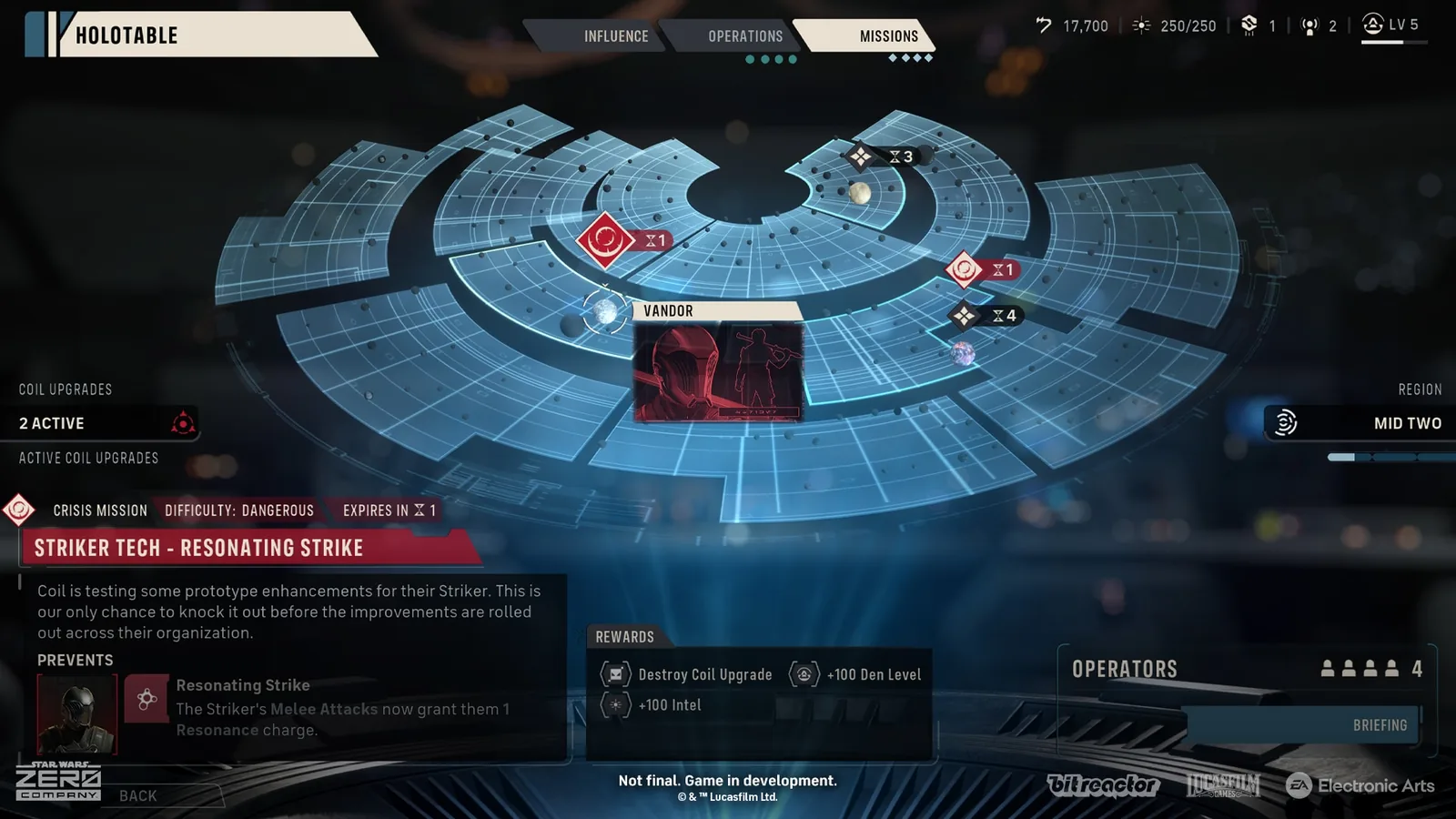
Check the remaining time before confirming an Operation. When the next Cycle begins, an activity that was visible may close, and the board can present a different set of options. Save a note of the Operation name, cost, timer, and result if you are testing a route or comparing two campaign states.
What an Operation can do
An Operation can yield an immediate reward, add narrative context, or unlock additional Operations and Missions. Operations are non-combat assignments that can require Intel and provide items, Credits, and other benefits.
The reward is not always the only reason to select one. A choice can increase Influence, support a Bond, reveal information, or change which side mission becomes available. Some choices may affect Bonds and side missions, but no guaranteed relationship result applies to all Operations.
Intel creates a second layer of planning. Missions and field activities can provide information, while Operations spend Intel when their panel requires it. Compare the current balance with the next visible cost and the time remaining. Spending everything on a small reward can leave the company unable to take a later branch that unlocks content.
How dilemmas work
Some Operations show more than one outcome. One option can favor a resource, another can favor Influence, and another can support a character or Bond. Read the result text, check the cost and risk, then choose the outcome that fits the current campaign goal.
The chain called A Friend of a Friend is a useful example of this format. It runs across seven Operation Cycles in the recorded route, and its branches include Credits, Influence, healing, a Bond benefit, a Max Health benefit, or a Capacitor choice. The exact availability of each branch in every campaign state remains To be confirmed.
A visible choice should not be confused with a universal recommendation. Record which Cycle displayed it, which Operators took part, and what the result screen showed. This is especially important for injury risk, permanent upgrades, and any choice that might remove another opportunity from the board.
Operations versus Tactical Missions
Tactical Missions are the combat layer. You deploy Operators, move through the environment, use cover and Action Points, and complete an objective marked in the interface. A Tactical Mission may include a short third-person free-roam phase in a story mission, but its defining step is the squad’s battlefield deployment.
Operations remain on the campaign layer. They can shape the story or economy without requiring a full combat map, and they can open the next mission or another strategic option. Keeping the terms separate helps when a player asks why an item appeared without a battle or why a map choice advanced a Bond.
Launching a Tactical Mission has a larger time cost than confirming a non-combat option because it moves the company into the next Cycle. Finish the Den conversations, repairs, upgrades, and resource choices that matter before deployment. The correct order for the whole campaign is To be confirmed, but preparation before the combat mission is part of the campaign loop.
A safe Operations routine
First, read every visible panel and mark the options that can expire. Second, check Intel, Influence, Credits, injuries, and the next Tactical Mission objective. Third, decide whether the reward solves a current problem or only looks attractive in isolation.
When a relationship matters, keep the participating Operators and the displayed outcome in your notes. When a resource matters, record whether the panel showed a cost, a cap increase, a payout, or a permanent upgrade. Do not turn a single campaign observation into a fixed rule when the game state is not reproducible.
The reliable habit is to use Operations to shape the next deployment. Spend Intel with a reason, watch the timer, preserve story-critical progress, and compare choices with the health and Bonds of the squad you actually intend to use. That makes the strategic layer useful without pretending that every unverified branch is settled.
Related knowledge
Related entities
Related articles
missions
Star Wars Zero Company Storm Basin Mission Guide
Learn how the Storm Basin rescue mission works in Star Wars Zero Company, including the Runa trigger, six civilians, six-turn objective, and route limits.
missions
Our Jedi Friend Operation Guide
Find the verified Our Jedi Friend choices, requirements, Intel cost, availability, and Smugglers' Den connection in STAR WARS Zero Company.
missions
Star Wars Zero Company Anaxes mission guide
Explore Star Wars Zero Company Anaxes missions, including Buy Cheap, Never Sleep, Kabb's required objective, Holotable access, rewards, and failure checks.
Was this helpful?
Thanks for the feedback.